What an AI Agent Costs Per Task vs. a Human Hour
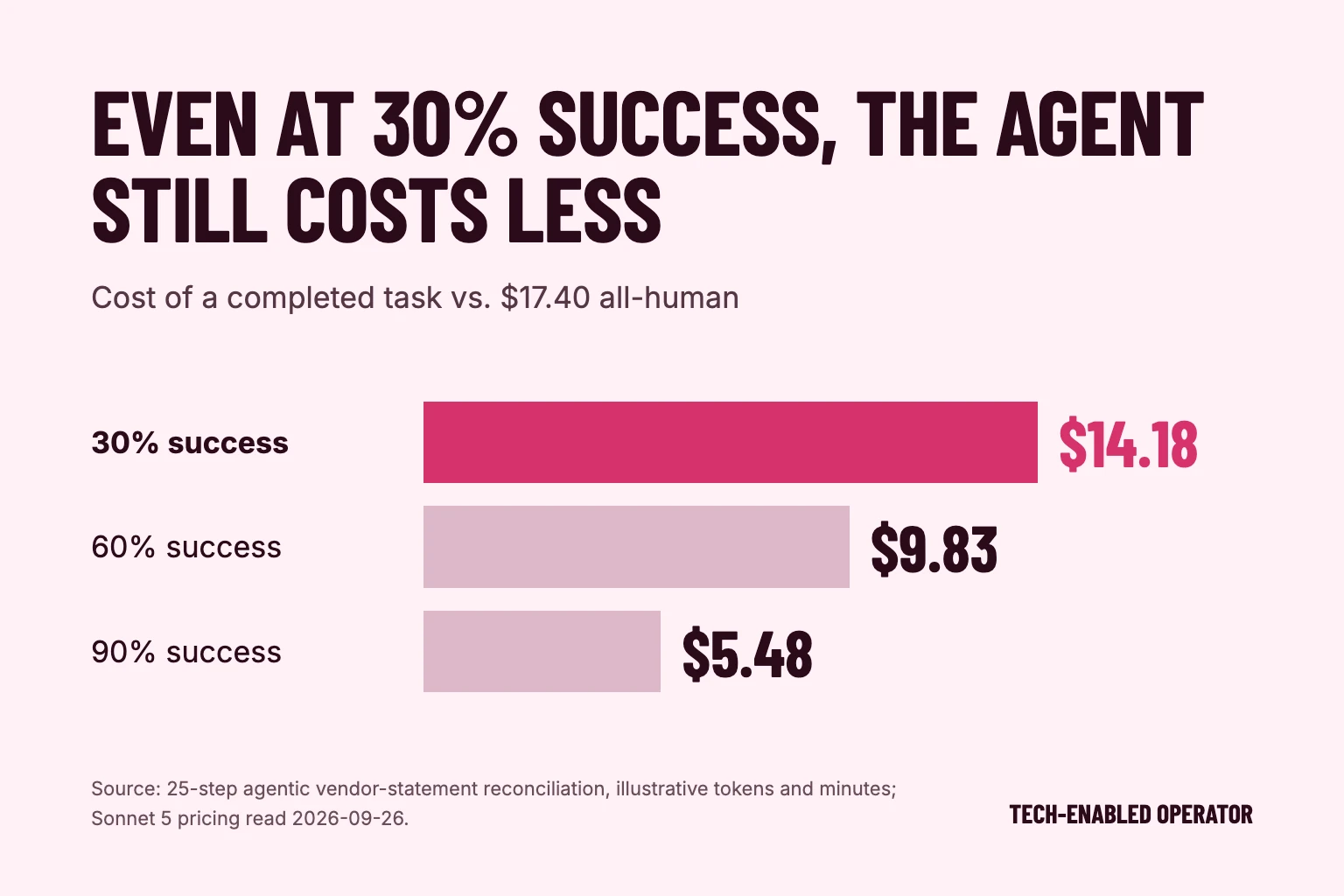
Price a back-office task both ways: the model bill and the loaded human minutes. The token cost is rarely the number that decides anything.
Tech-Enabled Operator
Adding software can leave the work problem unresolved. Answer seven plain questions about the work first, then put numbers on one task with the payback worksheet. Both print.
Open the checklistThis operator checklist gives small business owners and operators seven questions to discuss before adding technology or AI. It covers handoffs, responsibility, records, simpler options and ongoing costs. For context, read what to automate first and use the manual work audit to describe where work gets stuck.
The checklist is a discussion aid. Its prompts help you describe the work and the questions still open. Tech-Enabled Operator is partnered with SMB Investor Network.
What blocks this work, and what does the customer or team experience when it happens?
How does this work pass between people, what information travels with it, and where does the handoff become unclear?
Who owns this work, and who needs to interpret the result when context matters?
What can the available records establish, and what remains unknown?
Could clearer instructions, a different handoff or an existing tool address the problem?
What support, upkeep, review work and costs would the proposed change require?
What remains unresolved, and who on the team can help answer it before a tool is chosen?
Once the questions have answers, put numbers on the task. The worked example is 400 invoices a month at a bookkeeper's loaded cost of about $34.80 an hour, built from BLS wage and benefit data[1][2], with model cost from current list prices[3]. Everything else in it is an illustrative assumption. Replace every number with your own.
The task
Invoices, orders, tickets
After automating
One paid hour each
Time the automation replaces
Checking each item
Fixing the ones it gets wrong
Model or API cost
Keeping it running
Software fees
Rule changes through a developer
Net saving a month
$525
Payback on setup
2.9 months
First twelve months, after setup
$4,758
$1,544 setup and 400 invoices a month is the worked example from the automation payback figure. Replace every number with your own.
Method: net saving a month is the time replaced, minus checking, rework, model cost, upkeep, software fees and rule changes through a developer. Payback is the setup cost divided by that net saving. Same arithmetic as the automation payback figure on this site. Illustrative, not a measured result.
If it pays back in a few months at a realistic rework rate, the task is worth a small, supervised test.
If it only works when nothing comes back wrong, it is not ready. Go back to the handoff and the records.
If most of the cost is rule changes through a developer, fix who can change the rules before you automate anything else.
Describe a familiar work problem. Use an ordinary example your team recognizes, such as work waiting for missing information, and leave confidential details out.
Write what you know. Answer the prompts in plain language and leave uncertainties visible so an assumption does not become a fact.
Discuss the open question. Bring your notes to the people responsible for the work and ask what needs clarification before choosing a tool.
Try this prompt: What is waiting at the handoff, and what does the receiving person need to continue? Then ask: Do our records show that, or are we relying on memory? Write the gap as a question for the team.
No. The questions help you describe the decision, and the payback worksheet prices one task on numbers you enter. Neither scores your business or ranks tools. The people responsible for the work compare the options.
They draw on interviews about a healthcare service testing whether technology could ease its dependence on locations and clinicians, a founder mapping leadership roles before shifting work, and a financial adviser explaining why thin records limit analysis and automated reviews still need experienced interpretation. We turned those accounts into discussion prompts for your team.
Yes. Copy the questions into your own notes, or use the print button on the worksheet to save the page with your numbers. Nothing you type is stored or sent.
Price a back-office task both ways: the model bill and the loaded human minutes. The token cost is rarely the number that decides anything.